Introduction To TilePlus Toolkit
An introduction to this system
- Introduction To TilePlus Toolkit
- Upgrading From Earlier Versions
- Getting Started
- Key Elements
- TpLib Organization
- TpLib
- Editor Library
- Tile+Brush
- Design Philosophy
Introduction To TilePlus Toolkit
TilePlus Toolkit (TPT) is a unique way to work with Unity Tilemaps. It’s a Unity extension that can change the way you think about Tilemaps and how you use them.
This document applies to Version 6.
Main Features:
- New Tile class which allows private instance data on a per-tile basis.
- New Brush for the Unity Tilemap Editor which supports editing these tiles’ data.
- New Brushless Painting/Editing tool: Tile+Painter.
Other Capabilities:
- High-level ‘Tile Scene’ subsystem.
- Archiving of single or multiple Tilemaps for fast loading and chunking.
- Fine-grained tile animation control including rewinding, looping and ping-pong looping.
- Tiles can control the animator component of a spawned prefab.
- Tiles can message other tiles or send events to Monobehaviours.
- Monobehaviours or static classes can message tiles.
- Simple save/restore systems for tiles’ data.
- Built-in Zone creation for setting trigger zones.
- Chunking Layout System for top-down or side-scroll orthographic views.
- Pooled Prefab and Tile spawner.
- Dynamically loadable Runtime Services.
- Internal scheduler you can use for timers inside tile code or elsewhere.
- Customized Tweener for tile sprites, including limited GameObject support.
- Tween the tile sprite’s transform position, rotation, scale, matrix, or color.
- Tween GameObject position, rotation, scale, or color
- Tween GameObject position along a Bezier curve.
- Sequences are supported
- Convert Tweens and Sequences into Awaitables.
- Custom tweens: tween anything.
- Assortment of utility methods for Tilemaps.
- Several pre-created Tiles for common uses
- Use Tiles as UI.
- Animated and static buttons
- Ascii characters and strings (no editing)
- Hover zones for tooltips and tile animation triggering.
- Radio buttons
- Toggle buttons
And importantly, there is no interference with your existing project. No special dependencies, no special GameObject tags, no changes in how Tilemaps work: just a lot of C# code – and the source is included.
Upgrading From Earlier Versions
Upgrading
Please note that TilePlus version 6 no longer resides in the Plugins folder.
- Please ensure that you delete the Plugins/TilePlus and TilePlusExtras folders before upgrading.
If you're upgrading from Version 5 or earlier and you've been writing custom code using TilePlus' APIs:
- Copy your project and open the copy prior to loading TilePlus Version 6 or newer. You will have many errors due to API changes.
If you haven't written any custom code and use TilePlus Toolkit as-is, you should have no issues. However, please back up your project first.
Versions 5 and 6 removed some obsolete demo programs and certain infrequently-used or newly obsolete TilePlus tile classes and added several new or replacement classes.
Getting Started
If you’re not into coding and want to play with some feature demos, head over to the TilePlus Extras folder. Each demo has its own documentation in text or markdown format or look here.
If you haven't read the user guide, read it on this website and read it first.
If you want to use Tile+Painter: it has a short “Quick Guide”. Clicking the ‘?’ button in Painter displays a quick summary right in same window.
Other documentation
The basic user guide and an API reference (zip file) can be found in the TilePlusExtras/Documentation folder.
Click these links for the most recently-edited user guide and API references.
Find all additional documentation on this website.
Key Elements
New Tile Class
The key component of TPT is a new Tile base class cleverly dubbed “TilePlusBase” (TPB). This tile clones itself when placed on a Tilemap in a scene.
Why would anyone care?
The One With No Instance Data
One of the issues that developers run into with Unity Tilemaps is that there’s no way to add fields (variables) to tiles and have the data serialized and saved in the scene just like the serialized fields of scripts used for components. This is because the Tilemap’s serialization is hard-wired to save data from the basic fields present in a Tile class.
For many (including your TPT developer) this is annoying, to say the least. Perhaps you want a configurable waypoint. Maybe you want to be able to paint a tile and set it up as a spawn zone. And you want to be able to edit fields as you usually do.
Using TilePlusBase and the supporting libraries you can have any sort of code and/or data in a tile. Since the tile is cloned, it is no longer connected to the asset in the project folder: it exists in the Scene, and its data is saved with the scene.
If you’ve used the Unity Tilemap Editor (UTE) you’ve used its Selection Inspector. That inspector is very different from the normal Unity inspector panel: the UTE Selection Inspector is hard-wired to support the fields of the Tile-class tile and that’s it.
The support libraries for TPT have an alternative Selection Inspector that’s available in the UTE as the “Tile+Brush” or by using the TPT’s Tilemap painting and editing tool: Tile+Painter (T+P).
Decorate your TPB-derived tiles with TPT’s custom attributes and this alternative Selection Inspector lets you view and edit those fields or display property values. See Attributes.
Services
Services make it easier to use single-instance Scriptable Object assets as runtime-loadable code blocks.
- Replacing static classes with loadable classes can improve reload time in the editor.
- Unload code when you don't need it anymore to free memory.
- TilePlus includes several bundled services: Spawner, Tweener, and others.
- It's easy to add your own!
See the Services section for more information.
TileBundles and TileFabs
Another important feature of this system is the ability to archive the contents of one or more Tilemaps into archives which can be loaded by code.
With most Unity GameObjects + components you make prefabs.
They're not terribly useful with Tilemaps. If you instantiate such prefabs you'll end up with multiple Tilemaps and Grids. What would be more useful is the ability to quickly add and delete areas of tiles on demand.
That's what you can do with Bundles and TileFabs. These archives are also the only way to archive TilePlus tiles. Since these are scene objects and don't correspond to assets in the project, references to these are lost and one ends up with the familiar pink/whatever colored tiles.
The TilePlus system has a custom archiver that can:
- Bundle all tiles from a Tilemap.
- Bundle all the tiles from an area (Grid Selection) of a specified Tilemap.
- Optionally archive references to all Prefabs which are parented to the Tilemap's GameObject.
When presented with several Tilemaps, the archiver also creates a TileFab asset. This asset contains all the Bundle references for all the Tilemaps.
The TileFabLib static-class library has methods which allow loading of individual bundles or an entire set from a TileFab. There are both synchronous and asynchronous methods, and the async methods allow distributing individual bundles loads over several frames.
It's important to note that Bundles and TileFabs created from a Grid Selection (that is, just some portion of the Tilemap) are position-independent. This means that you can load a TileFab and its bundles anywhere on the Tilemap(s), not just their original locations.
Built on this framework are ZoneManager and ZoneLayout which are part of an automatic layout system for top-down views. This system adds and deletes TileFabs and their bundles as the Camera moves.
TileFabs and Bundles are also used extensively with Tile+Painter.
- They can be paintable objects
- Use them like paintable tile-prefabs.
- Select scene view areas to bundle.
- Select Palette areas to bundle
- And Much More (tm).
An even higher layer of software enables "tile scene" management.
See this for more information.
TpLib Organization
Overview
The TilePlus Toolkit base runtime system, generically called "TpLib," is divided into two groups of code. This is a block diagram of the core software. Dashed lines are inheritance, solid lines are dependencies.
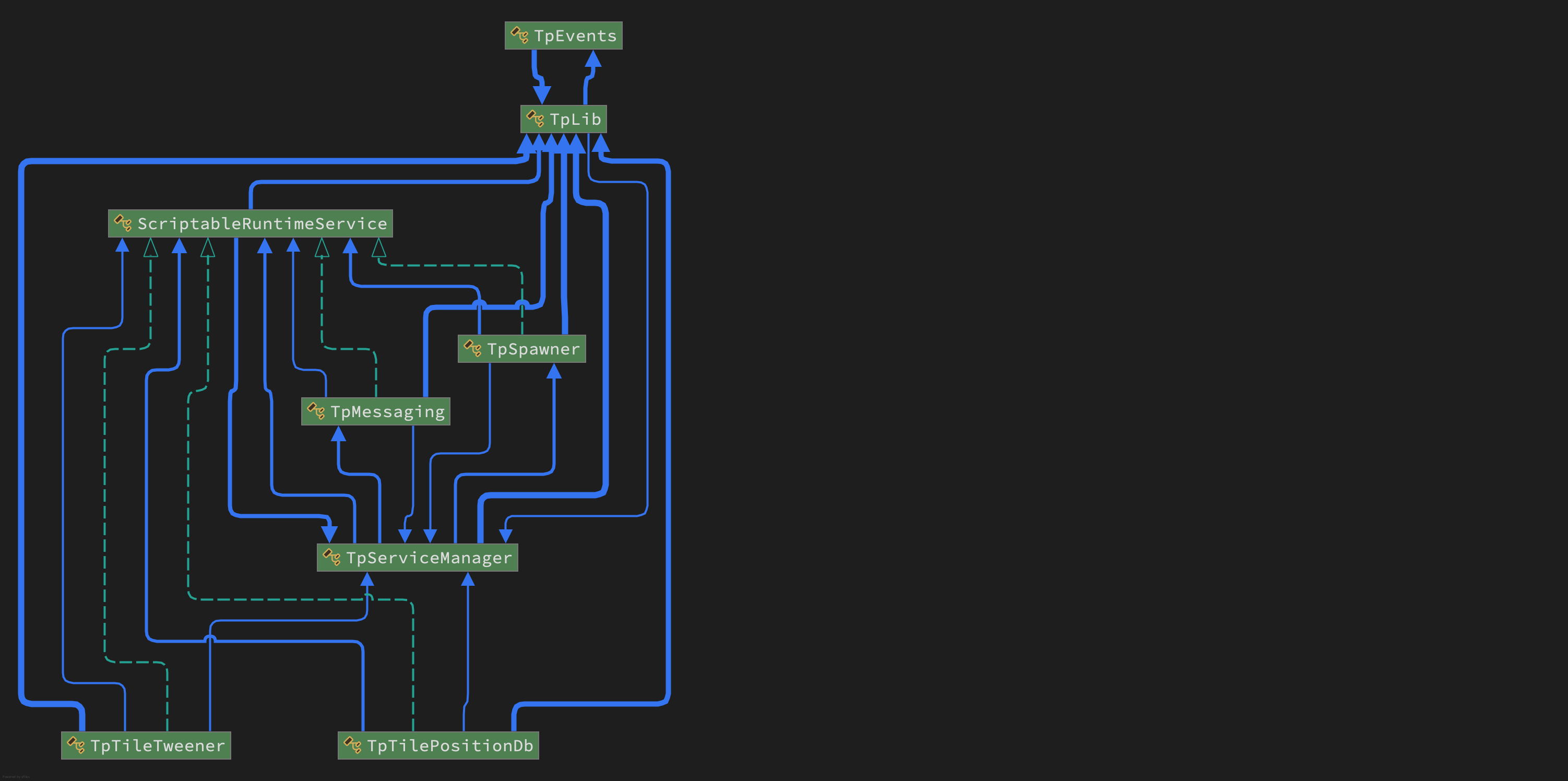
Note: this diagram shows Messaging as a service: in Version 6 that service was deleted and converted to a static class called TpMessages.
Static classes
- These are static because they are required for editing support, or have low impact on domain reloading, or are required immediately in a built-app or when switching to Play mode in the Editor.
- TpLib: The enabling and underlying library. Implements a Tilemap DataBase (TMDB) and queries, and provides update 'ticks' for various system functions.
- TpZoneManagerLib: Editing support and Tile+Painter.
- TpMessages: Typed messaging system featuring Monobehaviour-to-tile or tile-to-tile messaging and general messaging features.
- TpServiceManager: small and required immediately in Play mode.
- TileFabLib: API for loading Tilefabs and managing ZoneManagers (Layout system). Needed for both Edit and Play/Build use.
- TpTileUtils: small utility library, improper as service.
- TpEvents: small, required immediately in Play mode.
Generally, these have to be present after a domain reload and are required for edit support for the Tile+Brush, TilePlusPainter, etc. Where possible, their domain reload time is minimized by:
- Lazy initialization of arrays and lists
- Simple 'InitializeOnLoad' methods.
- Small memory allocations
- Overrideable with a project-level scriptable object for runtime initialization.
Scriptable Runtime Services
In this documentation these are often referred to as SRS. SRS are dynamically-loadable Scriptable Objects designed for independent services like those shown below or for any you create.
There's a simple base-class for these that you can use to create your own and add them to the system-level Service Manager.
These are runtime-only. They aren't needed for edit support and would impact domain reload time for various reasons, or perhaps you don't actually want to use all of these extra features.
- TpTweener: a tweener for tile sprites and GameObjects.
- TpSpawner: pooled spawner
- TpTilePositionDb: keeps track of occupied positions on specified Tilemaps.
Please see the Services section for more info.
TpLib
TpLib itself is a large class divided into eight partial classes:
- TpLib
- TpLibData
- TpLibDataAccess
- TpLibPools
- TpLibScene
- TpLibTasks
- TpLibTiming
An Editor folder has the final partial class:
- TpLibEditorUtils
If you're coding to the TpLib API, the parts you'd most likely be interested in are TpLibDataAccess, TpLibTasks, and TpLibTiming. Complete information can be found in the API reference (a zip file in the TilePlusExtras folder and here).
In this documentation, the dataset maintained in TpLib is generically called "Tilemap DataBase" or TMDB. It's not a database, but there's a set of query operations available which are tailored for use with TilePlus tiles and Unity Tilemaps. Data are added and removed from the TMDB automatically using features in the TilePlus tiles and the Unity Tilemap component.
TpLibDataAccess
The methods in TpLibDataAccess have pre-built 'queries' that allow you to extract information from the TMDB, which are data loaded into various structures in the TpLibData section of TpLib such as Types, Interfaces, Tags, GUIDs, etc.
There is also functionality for complex operations:
- Cut And Paste: Move a TPT tile from one position to another.
- Copy And Paste: Copy a TPT tile and place the copy elsewhere.
- This should always be used for this sort of operation so that the cloned tiles are copied correctly.
Queries
Please consult the API reference for complete information. Not every variation is shown below.
-
GetAllTilesInRegionForMap: load all TPT tiles on a specified Tilemap and within a RectInt region into a provided List.
-
GetAllTiles<T>: load all TPT tiles of Type T in all Tilemaps into a provided List, with filtering callback.
-
GetAllTilesOfType: load all TPT tiles of a particular Type from a specified Tilemap into a provided List, with filtering callback and a RectInt region. If the specified Tilemap is null, uses all Tilemaps.
-
GetAllTilesWithInterface<T>: load all TPT tiles from a specified Tilemap into a provided List, with filtering. If the Tilemap is null, uses all Tilemaps.
- An overload uses a provided list of Type T (saves casting later) and queries all Tilemaps. This includes a filter and a RectInt region.
-
GetTilesWithTag: Get all tiles on a specified Tilemap with a particular tag into a provided List with filtering and a RectInt region. If the specified Tilemap is null then all Tilemaps are used.
-
GetFirstTileWithTag: Convenience method, returns the first tile found from GetTilesWithTag.
-
GetTilePlusBaseFromGuid: Find a TPT tile on any Tilemap that has a specified GUID.
- Overloads allow use of a GUID string or byte array.
-
GetTilePlusBaseOfTypeFromGuid<T>: Similar to GetTilePlusBaseFromGuid but returns null if the tile is not of Type T.
The methods that don't take a Tilemap reference or allow the reference to be null provide a Tilemap- and position-independent way to locate tiles without having any idea where they are actually located.
This is extremely useful!
When used with the TileFab loading and the Layout systems you can easily locate TPT tiles as they're loaded and you won't get null ref errors after the tiles are unloaded.
You can use TpMessages to send messages to tiles based on their Type, Interface, tags, etc., without having to prebuild a list of targets. It happens auto-magically.
GUIDs
GUIDs can be used as a persistent identifier for a specific tile. That's all they are used for.
But they're incredibly useful, especially for saving and restoring data from and to TPT tile instances. See Persistence.
Since you can retrieve any TilePlus tile by searching TpLib using its GUID, it's a truly Tilemap-independent means of locating a tile.
TpLibTiming and TpLibTasks
TpLib's core is built around static classes and Scriptable Objects, neither of which have any access to what we're all used to in a Monobehaviour update.
TilePlus Services use a class derived from ScriptableObject called ScriptableRuntimeServices. There's a chapter of this book devoted to them but briefly, Services such as the Tweener and the PositionDatabase require an Update method.
TpLibTiming
The classic solution to having an Update in a non-Monobehaviour class like a static class or a Scriptable Object is to have a dont-destroy-on-load GameObject spawned that vectors its Update method somewhere else. TilePlus used to do this.
But with the advent of the various domain-reload options in the editor, its not that easy to make that work flawlessly for this sort of an extension.
TPT version 6 uses a modified Player Loop which updates at PostLateUpdate and just after 'Update'.
If you're curious, check it out.
That update 'tick' is used in many ways, and that brings us to TpLibTasks.
TpLibTasks
TpLibTiming invokes TpLibUpdate in the TpLibTasks partial class. Here's a brief description of what happens in that method.
-
If a target frame rate has been set the frame rate is calculated and maxima and minima are also calculated.
-
TpServiceManager's Update is invoked.
- The Service Manager sends an Update to all SRS that need it. This can change dynamically.
-
Delayed Callbacks are evaluated (see next section).
-
An internal cloning queue is examined and tiles waiting to be cloned are actually cloned at this time.
- This handles cases where TPT tiles are 'woken up' by the Tilemap before TpLib is ready to register them; these requests are cached until the proper time. This is basically an edge case.
Delayed Callbacks
As a simple example: a tile wants to delete itself when its StartUp method is invoked (this is a real case). If you do something like:
Tilemap.SetTile(position,null)
from within that StartUp method Unity usually crashes.
In Editor windows, doing certain types of things during a GUI event cause GuiClip and other errors.
So lots of times you want to just wait till the end of the frame to perform these actions.
Or maybe a TPT tile wants to spawn a prefab 1 second after being sent a Message.
One way to do this is by using Coroutines or Awaitables/async methods. But that's actually way more complex than needed.
The DelayedCallback method is simple to use. It works within the TpLibUpdate method mentioned above to process these callbacks.
You can also provide a 'Condition' Func to test a condition, so if that condition isn't fulfilled by the end of the specified delay the delayed callback isn't actually invoked until the condition is met and the Condition func returns true.
This method is used over 80 times in TPT (including the demos). It's very useful, and being removed from the scene hierarchy it isn't affected by scene loading or unloading. Null-checking is used throughout so if a TPT tile, an Editor Window, or some other caller which could possibly become null does become null is deleted prior to the timeout then the callback is not executed.
Repeated Invokes
The convenience method InvokeRepeatingUntil sets up a automatically-repeating callback or timer.
It's essentially DelayedCallback with an empty Callback method. The parameter invokedFunc is the same as the Condition for DelayedCallback. The invokedFunc is a func taking a float [Time.deltaTime] and returning a bool.
Like DelayedCallback, the ID of the process is returned so you can terminate it if you want to. But it can be done by the repeatedly-invoked Func.
This Func is executed at a rate set with the repeatInterval parameter. If the Func returns false the timer continues running. When the Func returns true the timer terminates. In other words, you don't have to explicitly terminate the timer via its ID.
- the Func is equivalent to the Condition Func for DelayedCallback: return false = condition not satisfied.
Unlike DelayedCallback, the parent parameter can't be null.
An example of this sort of use can be seen in the CloudSpawnerTile, which is part of the Topdown Layout demo.
Update for Tiles
Use InvokeRepeatingUntil with an appropriate interval.
Editor Library
The Editor Library comprises, well, a whole lot of stuff!
There's no exhaustive explanation or API reference for this part of TilePlus. This one also advises you that Molag Bal will visit you if you mess around with this code. Seriously, there's no need although there's a lot of clues for those who like editor code.
Painter is a Painting / Editing tool with separate documentation for you to read. It’s UI-Elements based and does away with the concept of brushes completely.
Tile+Brush
When using the Unity Tilemap Editor (UTE) you can use the Tile+Brush instead of the default GridBrush.
The Tile+Brush is installed by default when you install the TilePlus package. The User Guide explains how to revert that if you want to.
Brushes have Brush and Selection inspectors. The Brush inspector is what's shown in the bottom portion of the UTE window. The Selection inspector replaces the normal Unity inspector when you select a tile with the UTE.
The Tile+Brush has replacment Brush and Selection inspectors that can display fields and properties from TilePlus tile instances. Tile+Painter uses the Brush's Selection inspector and a modified version of the Brush inspector when it displays tile information.
For more detailed information, see the User Guide and this.
Design Philosophy
In an earlier epoch I designed embedded system hardware, software, and development tools in two different areas:
- Pro Audio
- Digital Signal Processing
Both of these fields are 'real-time' programming. It's not dissimilar to what you have to deal with in Unity3D:
-
A frame in pro audio at 44.1 kHz doesn't allow much time per-sample to process much, about 22 microseconds.
-
A frame in a game at 60 Hz is about 17 milliseconds which sounds quite generous by comparison.
Either way, you have a certain amount of time to do your processing or:
- Audio ==> Audible 'artifacts' such as clicks and pops
- Game ==> Dropped frames
This is all to say that this biased my approach to coding: performance and memory are #1.
So I tend to eschew the modern programming idiom of write first optimize later.
- If using a little more memory increases overall execution speed: use the extra memory.
- Use inheritance and interfaces for Tile classes.
- Use generics where it makes sense (to me), such as in the
MessagingService's messages. - Tightly hardcode things that by nature have to be optimized, such as the
TweenerService and the internals ofTpLibTasks. - Extensively pool class instances and other objects.
- Extensively cache tile instances in the layout system.
No acronym-based coding style will be found anywhere :-)